
Checkout
How the onsite checkout works
A customer arrives on your website and clicks on a payment button.
Your website loads up the Hubtel Payment page within your website preferably in an iframe
The customer selects how they wish to make payment
The customer verifies their identity by inputing their mobile number to receive an OTP or scanning a QR Code with their Hubtel app
The customer proceeds to choose a suitable payment option or add a new payment option.
When payment is completed, a success or failure notification is presented to the customer
The customer is finally redirected back to your website via your redirect URL
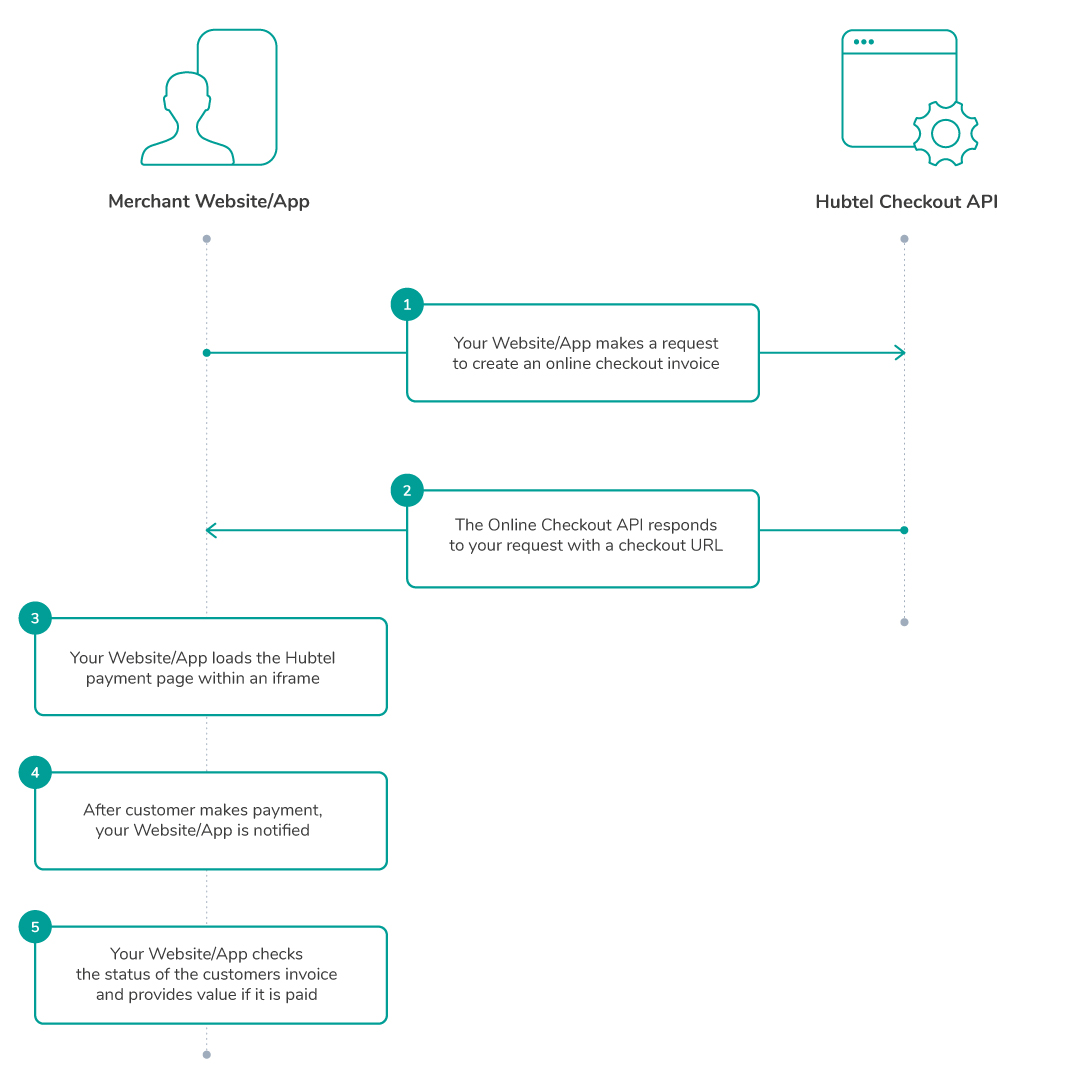
Steps
Your app makes an HTTP POST request to the Online Checkout API to create an invoice.
Your app receives a response with a checkoutDirectUrl.
Your app then loads the checkoutDirectUrl within your website in an iframe
After payment is fulfilled, A Callback is sent to your callbackUrl and your returnUrl is loaded.
Your app then makes a request to check and confirm the status of the payment if required.
The checkout invoice has three (3) statuses: pending, completed and cancelled.
Last updated